EMF Protection for Home: A Practical Room-by-Room Guide
*The information on EMF Academy is for educational purposes only and is not a substitute for professional medical advice. Please review our full Medical Disclaimer for more details. This post may contain affiliate links. Please see my disclosure to learn more.
If you want to reduce a particular electromagnetic field in your home, start by identifying the source and deciding what you want to change. Moving a router, changing a phone habit and investigating a wiring concern are different jobs. One product cannot be assumed to solve all three.
My advice is to try a practical change you can reverse before buying protection gear. Keep the Internet connection, alarms and other services your household needs working, and check what changed. A lower reading at one point is not proof that a room is medically safe or that someone’s symptoms have been treated.
Earlier versions of this guide included a quiz that declared homes “EMF safe” and presented an Aires room device as a quick protection solution. I’ve removed those conclusions. This guide now explains how to review your rooms, what a meter can tell you, and the questions to ask before buying shielding products. The product photos are from the earlier article, not a new hands-on test.
Put the health claims in context
EMF is a broad term. Household wiring and appliances produce low-frequency electric and magnetic fields; Wi-Fi and mobile devices use radiofrequency signals. The UK Health Security Agency’s field guide explains those differences. A reading in volts per metre is not interchangeable with one in microteslas or milliwatts per square metre.
For ordinary Wi-Fi, UKHSA’s guidance updated in February 2025 reports no consistent evidence of adverse effects on the general population and says additional individual or communal exposure reduction is unnecessary. That guidance does not promise that every possible exposure is harmless. It does mean this article should not treat having a working home network as evidence of a dangerous house.
Low-frequency magnetic fields have a different evidence history. UKHSA describes an association between higher average residential exposure and childhood leukaemia in some population studies, while explaining that the evidence does not establish causation. That is not a reason to infer a child’s cancer risk from one consumer-meter reading or to assume a Wi-Fi shield addresses a wiring field.
If symptoms are the reason you are looking for protection, take them seriously and seek medical evaluation. WHO’s December 2005 hypersensitivity backgrounder recognizes that reported symptoms can be real and disabling while stating that an EMF link has not been scientifically established. It is an older backgrounder, not a new clinical review. This guide cannot diagnose fatigue, tinnitus, palpitations or sleep problems from where devices sit in a room.
Review the rooms you actually use
Walk through your home and note the devices near the places you spend time. Include the devices themselves and their power supplies. Do not rank a baby monitor, laptop or router as the strongest source just by its name. Its operating mode, distance and the field you are considering all matter.
| Room | What to note | First step | Check afterwards |
|---|---|---|---|
| Bedroom | Phone, charger, nearby router or mesh node | Move a phone off the pillow or bedside area if you prefer more distance | Calls, alarms and any essential connected equipment still work |
| Home office | Laptop, Wi-Fi connection, powered equipment | Use an existing Ethernet connection if it suits your setup | The intended wired connection works; radios are checked separately |
| Living room | Router, television and smart-home hubs | Choose an open router position away from the spot you sit | Coverage and required smart-home functions remain reliable |
| Nursery | Baby monitor and its power cord | Follow the exact monitor placement instructions and secure cords | Cord safety, a clear view and reliable alerts |
| Utility or meter wall | Electrical equipment and utility-owned meter | Identify ownership and ask for appropriate professional advice | No covers, wiring or utility equipment modified by guesswork |
| Outside-facing room | Nearby transmitters or power infrastructure | Record the concern and seek a relevant assessment if needed | The field type and suitable instrument are identified before shielding |
The nursery deserves a separate practical check. The U.S. Consumer Product Safety Commission’s monitor alert says cords should be at least three feet from any part of a crib, bassinet or other safe sleep space and out of a child’s reach. That is cord-strangulation guidance, not an RF safety threshold. Never position the monitor inside or on the crib edge. Follow any additional instructions for your exact model.
The earlier quiz recommended a belly blanket as protection for an unborn baby. That recommendation was not supported by evidence explained in the article. A quiz score, product label or shielding-material demonstration cannot establish a pregnancy benefit. Discuss pregnancy-related concerns with your clinician rather than treating this checklist as a medical assessment.
Change Wi-Fi without losing useful services
Start with placement. TP-Link’s router guidance recommends a central, elevated, open location for coverage and explains that enclosed spaces can trap heat. For a router currently beside your bed or desk, consider another practical open location. Test the connection in the rooms that need it. There is no universal distance here that certifies safety.
A wired connection can be useful for a computer that stays in one place. Check the ports and adapter you actually need before buying a cable. Once connected, verify that the computer is using Ethernet. Plugging in a cable does not by itself confirm that its Wi-Fi or Bluetooth radios have been disabled; those are separate settings. Avoid routing loose cables where people walk.
An Internet pause feature is also different from a radio-off setting. For example, Google’s Family Wi-Fi documentation describes pausing Internet access for selected devices or groups. That does not establish that the router’s transmitter has stopped. Check the exact manufacturer instructions if your aim is to disable a radio, rather than to keep a device offline.
Before scheduling a network shutdown, list what depends on it: phones using Wi-Fi calling, security devices, alerts, cameras and any connected equipment your household relies on. Try a short supervised test and confirm recovery before setting a repeating schedule. Keep essential functions available. I would not start by buying a plug timer and cutting power to the whole network every night.
For phone and meter considerations, see our guide to 5G exposure and product limits. Choose a change that fits your household. Turning off a transmitter stops that transmitter’s operation; it does not remove fields from other sources or establish a health improvement.
Decide whether you need an EMF meter
A meter is optional. You can move a phone or check router settings without buying one. If you want to compare field readings before and after a change, first identify the field and frequencies you need it to measure. A magnetic-field detector alone cannot answer a Wi-Fi RF question, and an RF detector does not automatically assess a wiring problem.
The GQ EMF-390 previously linked here is one consumer option for comparing electric, magnetic and RF readings within its specifications. The manufacturer’s description distinguishes RF detection up to 10 GHz from a spectrum display covering selected bands up to about 2.5 GHz. It is not a full spectrum sweep of every signal below 10 GHz, and it does not cover frequencies above that limit.
The published GQ user guide (revision 1.94, October 2021) lists an RF detectable range of 10 MHz to 10 GHz and an RF accuracy specification of ±10 dB. Those are manufacturer specifications, not an independent calibration result. I would not describe this as a precise measurement of every source or claim it detects nearly every 5G installation. Read the instructions for your exact version before relying on a comparison.
If that measurement task suits your needs, you can check the GQ EMF-390 listing on Amazon. This is an affiliate link. As an Amazon Associate, I earn from qualifying purchases. Compare its limits with the alternatives in our EMF meter guide. A purchase is not required to use the room checklist.
For a useful comparison, record the meter model, mode, units, position and orientation, along with which devices were operating. Use the same setup before and after one change and repeat the observation. Note whether you recorded a peak, average or other display value. Otherwise, a difference may reflect a changed test arrangement rather than your intended change.
Treat a consumer display or alarm as information to interpret within the instrument’s limits. It cannot diagnose symptoms, certify compliance or provide a health clearance for the whole home. If you need a compliance assessment or an explanation of a persistent electrical concern, use an appropriately qualified professional with suitable equipment.
Check protection-product claims before buying
Aires room devices
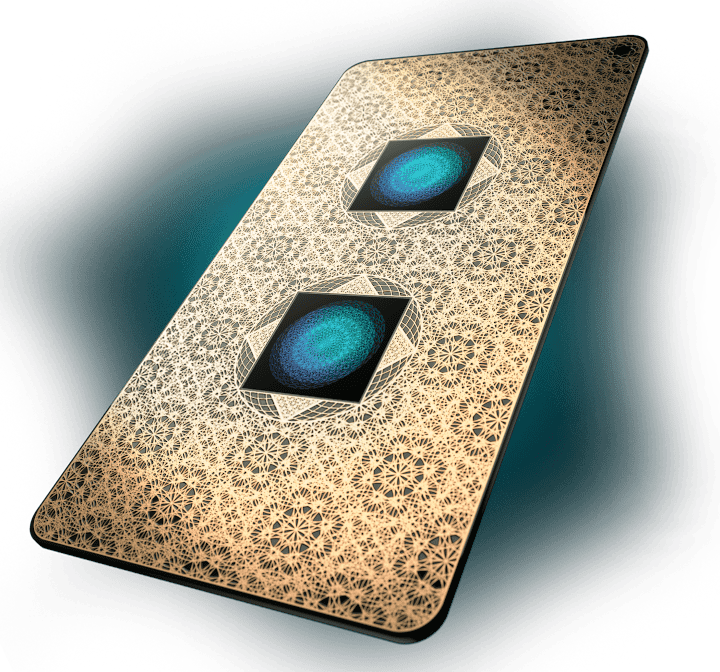
This article previously described a Lifetune Room device as immediate protection for 500 square feet and recommended it for children’s rooms, offices and open-plan homes. I no longer present that floor area as a verified health-protection result or recommend buying several devices to cover a house.
Aires’s technology overview describes field modulation without attenuation and says signal amplitude is unchanged. That is an attributed manufacturer claim. It is not a measured reduction of all fields in a room, and patents, spending or personal enthusiasm do not establish prevention of illness. Our Aires review examines the evidence and its limits more closely.
Router guards
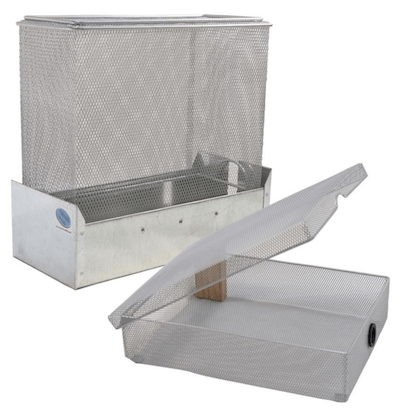
The old guide claimed a 90% RF reduction with only a 10% range reduction and no speed loss. Those figures should not be treated as a guarantee for every router or home. Ask for the complete report for the exact enclosure, router, frequencies and measurement positions. Also check ventilation, coverage and device connections in your own setup.
A lower reading outside an enclosure is not, by itself, proof of a health benefit or a complete assessment of what happens to every connected device. I would try placement or an appropriate wired connection before buying a guard. This guide no longer presents a cage as all the convenience with a fraction of the health risk.
Bed canopies and shielding paint

A fabric or paint test does not establish how a finished bedroom performs. Ask what was measured, at which frequencies, and whether the result describes a sample or the installed enclosure. Check doors, windows, openings, installation instructions and sources within the space. Do not assume an RF shielding product also addresses every low-frequency magnetic field.
For example, YSHIELD’s HSF54 description gives attenuation figures tied to coat coverage and frequency and requires its conductive surface to be integrated into functional equipotential bonding. That is a product-specific installation requirement, not a do-it-yourself grounding instruction for every shielding material. Get appropriate installation advice before making a conductive coating part of a room.
I’ve removed the earlier claims that a canopy blocks radiation entirely, makes other precautions unnecessary or reliably improves sleep. Nor does this guide prescribe incandescent bulbs as an EMF protection purchase. Lighting comfort, electrical compatibility and any symptoms should be considered on their own terms, rather than folded into a universal shielding solution.
Use a room worksheet instead of a safety score
Copy these fields into a notebook or print this section for the room you want to review. Leave the measurement fields blank if you do not have a suitable instrument. The aim is a clear record of one change and its practical result, not a numerical verdict on your health.
| Field | What to record |
|---|---|
| Room and goal | Where you spend time and the specific source or habit you want to review |
| Device and operating state | Model, radios or functions in use, and any required household services |
| Before | Position or habit; meter model, mode, units and reading if applicable |
| One change | What you moved or adjusted, and how you can reverse it |
| After | Same measurement setup if used; repeat observation and connection/function check |
| Decision | Keep, reverse or investigate; any question for the manufacturer or a qualified professional |
For example, a bedroom entry might record that you moved a router from the bedside to an open shelf in another room, then checked coverage and any essential alerts. If you used a suitable meter, record the same location and mode on both occasions. Do not turn that entry into a promise of better sleep or lower disease risk.
For phone calls, the National Cancer Institute’s fact sheet describes speakerphone or a headset as ways to increase distance between the phone and head. You can try equipment you already have. That is a specific use change, not a reason to buy an accessory promising whole-house protection.
Common questions
What is the best EMF protection for a home?
There is no single product established here as protection from every field or health effect. Identify the source and your goal, try a practical reversible change, and use appropriate measurements if needed. A quiz or one meter reading cannot certify a home as safe.
Does turning off Wi-Fi at night help?
Disabling a router’s radio stops that radio’s operation, but an Internet pause may only block access for selected devices. Check the exact controls and essential household services before scheduling a shutdown. It does not remove other sources or establish a health improvement.
Can an EMF meter tell me whether my house is safe?
A consumer meter measures selected fields within its specifications. Its display cannot diagnose symptoms or certify the safety or compliance of an entire home. Keep field types, units, operating conditions and instrument limits clear when making comparisons.
Will a bed canopy or shielding paint block all EMF?
Do not assume that. Review the relevant frequency-dependent report and the requirements of the finished installation. A sample result does not establish complete room coverage, every field type or improved health. Follow product-specific installation advice and use qualified help where appropriate.